Is it still not recommended to install Kicad on Mint with Cinnamon desktop? Aree the issues with mint/cinnamon gone with latest versions of kicad and mint? …or should one still avoid this combination?
Who and when said/wrote this?
What issues?
I’ve been using Mint Cinnamon since Kicad 4 and found no issues regarding this OS.
Edit:
The Kicad Download page states that Mint is unsupported, but that is not quite the same as not recommended.
As I wrote above, I’ve never had any problems with any bugs related to the OS. I have only ever found one minor graphical color problems when using the Color plug-in “wDark”, but none when using the Kicad, or personally modified Kicad, color themes.
1 Like
I remember texts in entry boxes not being completely visible with some “themes” under Linux, and I was one of the people who had that problem (Linux Mint LXDE desktop). But that was years ago.
I’m running Kicad v8 on Linux Mint 22.2 Zara (Xfce edition) without issues. I’ve been also using this platform since v4.
The Kicad download page also states that “In particular, the Cinnamon desktop environment is known to have several UI bugs that affect KiCad.” , that’s what caught my attention. It’s a lot easier to make different choices now before installing software than later, but maybe this isn’t really an issue with latest versions?
Try it and find out. One of the major issues back then was the theme that cinnamon used messed with general text…
with improvements in mint and cinnamon and newer kicad, especially with darkmode, it might have improved (I can’t be bothered to spin up a VM to test)
The main problem with the majority of Linux distributions is Wayland
I’m on old hardware and I actually have to switch between X11 and Wayland depending on what I want to work. 
To satisfy the curiosity every one must have over the fault I found with the wDark theme on Mint, here it is:
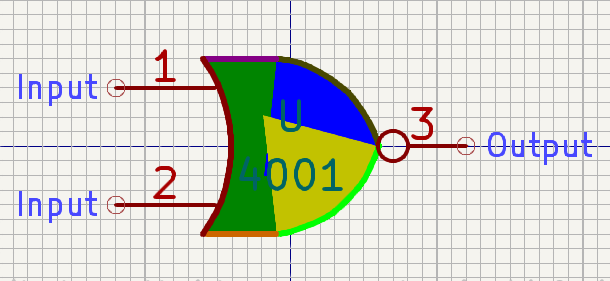
I found that I couldn’t (and still can’t) alter the colors of the segments of the graphics individually in wDark, as I could in the standard Kicad themes.
Whether this is a Kicad, a Plug-in, or an OS problem, I neither know nor care. I’m not interested in bothering people to find out.
And why did I attempt this in the first place? It was a joke on a friend who complained that schematics always looked so boring. 
Maybe time for some newer hardware? Even brand new hardware is not expensive if you’re capable of cobbling some parts together. I built my new PCB with a Ryzen 5600G now 3 years ago. I just had a look at the shop I bought the parts for current prices of a comparable setup:
EUR  Item
140 	5600G Processor with built in Graphics.
100 	Mobo (Asrock with B450 or B550)
60 	16 GB RAM
40 	SSD 512GB
So that’s EUR 350 for the main parts for a decent PC. I re-used an old case myself, I also bought a new power supply just because the old one was over 12 years old, but a new power supply is “optional”. You can re-use the old one, provided that your old PC is not a “brand name” PC. The “Brand name” PC’s often use different from factors from the standards.
Wayland lacks many features that X11 had by design. The mass switch to Wayland has caused many issues for KiCad and other multi-window applications.
I think I’m migrating to Linux with Microsofts heavy-handed requirements for Win11. I chose Linux Mint and recently updated it to 22 ‘Wilma’. One can choose default (X11?) or Wayland (experimental) upon login. While I’ve not used KiCad under Linux Mint a whole lot, (I’m also dual booting to Win10) I’ve kicked it around a bit both with X11 and Wayland and it’s seems fine to me either way. I’m not using many rainbow colored nor gates however. 
1 Like
FlatPak is officially supported by KiCad and is our recommended way to install the latest version of KiCad on any distribution other than Ubuntu and Fedora, if it is not available through your distribution’s package manager.
That’s interesting because I read awhile back that RH and Debian were championing the idea of making FlatPak the default method of package installation. Ubuntu obviously has there SNAPS so I can see that one.
Flatpak, Snap, and other containers are great for security and compatibility, but not for performance or hardware accessibility. They’re designed specifically to keep everything to itself.
If something works inside a container, that’s great! But there are some apps that don’t, and need to be installed natively instead. Because I use a couple of those, I like to have everything native, just as a standard for my own management. YMMV.
I was a tad dismayed when I read the article saying RH and Debian were on board. Mainly from a bloat perspective. Also, it seems a tad lazy and sloppy?
1 Like
I think you are confusing the official statement that stated that professional users should used X11 instead of Wayalnad as Wayalnad still have some bugs which affect soem stuffs like window size and memory of position of a window when used last time.
Linux Mint is X11, so no issues
I agree with pretty much all of that. Especially when I routinely have complex projects that run perfectly well on a single-threaded 8-bit CPU at 20MHz with 1k of RAM and 2k of code…if even that.
But if Moore’s Law is finally running into some limits caused by quantum mechanics because of the feature size, maybe it’ll force some reconsideration? Maybe?
Quantum computers are supposed to take advantage of those effects, but they are completely different machines that don’t work at all like we’re used to. So you can’t just port an existing app. You have to write it all over again from scratch using completely different principles. Once they even get out of the lab, which they haven’t yet.
For AI “assistants”, it’s absolutely laziness. And idiots who buy the hype and force it on everyone. The broader category of machine learning has its place, as does the subset of it that we now call AI, but nowhere near the “shotgun broadcast and see what sticks” approach that we’re seeing now. Especially when it’s being forced to stick in places that it hurts badly.
I’ve posted this before. My son, who codes and let’s just say is smarter than the average bear, says it’s OK as an ‘auto complete’ feature.
Just a comment, to manage expectations.
I haven’t found many diferences in terms of memory consumption and CPU between Win11 pro (trimmed down), Kubuntu (Wayland) LM (cinammon), all of them sits around 1.4~ 1.5 GB, just in case with no additional programs running. Kubuntu and LM, using 3-7% of the CPU doing nothing. Windows 11 1%.
That is with the massive amount of windows crapware and telemetry removed and updates in check, off course.
For Windows 10, you might want some versions of LTSC will have some more years of security updates.
Xfce and MATE are lower, but those and 4k resolution are a pain in the neck for me in desktop set up.
Oh and Kicad 9 seems to do fine on LM Cinammon, but I have not been testing that set up thoughtfully.